Direct answer: Learn the food cost formula, calculate food cost percentage with a real worked example, and see why prep loss and cooking loss make most spreadsheets wrong.
Food cost is the share of a dish's menu price that goes to its ingredients. Calculate it correctly and you can price with confidence, protect your margin, and spot the dishes quietly losing money. Calculate it the usual spreadsheet way — invoice price times recipe weight — and you will almost always understate it, because that method ignores the food you buy but never serve.
This guide gives you the formula, a real worked example costed in FoodTechGuru, and the two adjustments most kitchens miss.
The food cost formula
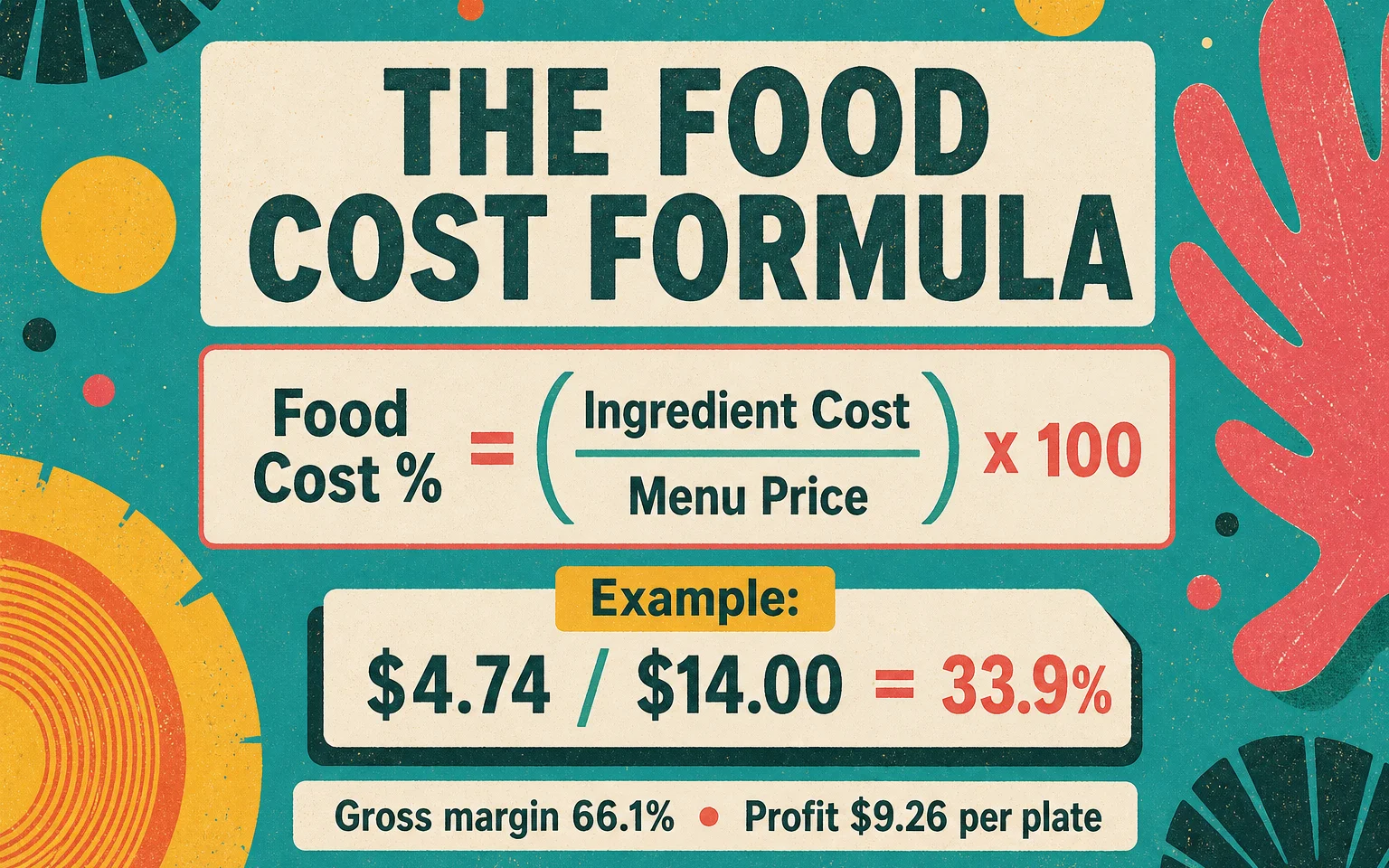
> Food cost percentage = (ingredient cost ÷ menu price) × 100
If a dish costs $4.74 in ingredients and sells for $14.00, the food cost is 4.74 ÷ 14.00 × 100 = 33.9%. The rest — 66.1%, or $9.26 per plate — is your gross margin before labour, rent, and overhead.
Two numbers drive everything: the true ingredient cost of one serving, and the menu price. The menu price is easy. The ingredient cost is where the mistakes live.
How to calculate the ingredient cost of one serving
Work one ingredient at a time, then add them up:
- Start from the purchase price — what you actually pay your supplier, per kilogram or per unit.
- Use the quantity in the finished recipe — the grams of each ingredient that go into one portion.
- Add the food you buy but cannot serve — trim, peel, and bones (prep loss), and the weight lost during cooking (cooking loss).
- Multiply quantity × price for each line, then sum the lines to get the cost per serving.
Skip step 3 and your numbers look cheaper than reality on every single plate.
Worked example: a $14.00 grilled chicken Caesar salad
Here is a real cost card generated in FoodTechGuru for a single grilled chicken Caesar salad, using US food-service prices — the exact numbers, not an illustration. Change a price or a portion and every total recalculates, exactly as it does in the app.
Add the eight ingredient lines and the salad costs $4.74. At a $14.00 menu price, that is a 33.9% food cost and a 66.1% gross margin — a healthy plate for a casual full-service restaurant.
The same card is also a shareable, read-only Google Sheet — open the cost sheet, or read the colour-coded card below (yellow = input weights, blue = loss factors, green = calculated), down to the Total Initial Weight row:
Why your food cost is usually understated
Two adjustments separate a real cost card from a spreadsheet guess. Both are visible in the table above.
Prep loss (yield). You buy 1,000 g of romaine, but the outer leaves and core never reach the bowl. At roughly 10% trim loss, only 900 g is usable, so the edible cost per kilogram is higher than the invoice. A spreadsheet that uses the invoice price alone undercounts every leafy, root, and whole-fruit ingredient on the menu.
Cooking loss. Protein loses weight on the grill. The Caesar uses 150 g of raw chicken, but at a 25% cooking loss the guest receives only about 112 g of cooked chicken on the plate. The chicken still costs what you paid for 150 g raw — so the real cost per gram served is meaningfully higher than the raw invoice price suggests. Ignore this and a protein-heavy menu looks more profitable on paper than it is in the bank.
FoodTechGuru keeps prep loss and cooking loss as separate, editable coefficients for every ingredient, so the cost card shows where the money actually goes — purchasing, prep, or the pass. Here is that journey for the chicken in this salad, from what you buy to what the guest is served:
What is a good food cost percentage?
There is no single correct number — it depends on your format and your other costs. These are common industry ranges:
| Format | Typical food cost |
|---|---|
| Quick-service / fast casual | 25–30% |
| Full-service restaurant | 28–35% |
| Fine dining | 30–40% |
| Bar & pub food | 30–35% |
| Café & bakery | 25–30% |
A 32% dish can be excellent if it is fast and popular; a 24% dish can be weak if it is slow to make or needs expensive packaging. Use food cost percentage to price, then use contribution margin to decide what to push.
From food cost to menu price
Run the formula backwards to price a new dish. If your target food cost is 30% and the plate costs $4.74:
> Menu price = ingredient cost ÷ target food cost → 4.74 ÷ 0.30 = $15.80
If the market will only bear $14.00, you can see the gap immediately and decide: adjust the portion, renegotiate the chicken price, or accept the 33.9% and the strong $9.26 margin. Pricing becomes a decision instead of a guess.
How FoodTechGuru calculates food cost automatically
Building a card like this by hand takes real time, and the loss factors are easy to forget. FoodTechGuru does the costing for you:
- Capture the recipe any way you work — type it, photograph a handwritten card, dictate it while you prep, or paste an Instagram, TikTok, or YouTube link to a cooking video.
- Get a structured cost card with ingredients grouped by prep stage, prep and cooking loss applied, gross purchasing weight, cost per serving, food cost %, and margin.
- Export to Google Sheets for free to review, edit, and share with your team — color-coded so editable and calculated cells are obvious.
- Roll dishes into a menu to see contribution margin and a Star / Plowhorse / Puzzle / Dog classification, and to generate a shopping list at any number of covers.
It is built for chefs, restaurant owners, and food technologists who price their own menus. FoodTechGuru is available as an iOS app (Android is coming), with free credits to cost your first dishes.
New to cost cards? Start with our food cost calculator for a quick estimate, or the recipe cost calculator to cost a full recipe, then let the app generate the complete card from a photo or a voice note. Download FoodTechGuru on the App Store.
FAQ
How do you calculate food cost? Add up the true cost of every ingredient in one serving — including prep loss and cooking loss — then divide by the menu price and multiply by 100. Example: $4.74 ingredient cost ÷ $14.00 price × 100 = 33.9% food cost.
What is the food cost formula? Food cost percentage = (ingredient cost ÷ menu price) × 100. To price a dish from a target food cost, reverse it: menu price = ingredient cost ÷ target food cost percentage.
What is a good food cost percentage? Most restaurants aim for 28–35%, with quick-service often lower (25–30%) and fine dining higher (30–40%) because of premium ingredients. The right number depends on your format and your labour and overhead.
Why does prep loss and cooking loss matter? They raise the real cost of what you serve. Invoice-only spreadsheets ignore trim, peel, bones, and the weight lost in cooking, so they understate food cost on almost every dish — often by several points.
Can FoodTechGuru calculate food cost for me? Yes. It turns a typed, photographed, dictated, or linked recipe into a structured cost card with prep and cooking loss, cost per serving, food cost %, and margin, and exports it to Google Sheets for free.
Build It Faster In FoodTechGuru
FoodTechGuru turns recipes, photos, and kitchen notes into cost cards with prep loss, cooking loss, labour, utility, and price logic already structured for operators.