A business plan is only as good as the food cost underneath it
Every first-time operator hits the same wall. The concept is clear, the menu is written, the pitch or the lease is nearly agreed, and then someone asks for the numbers. Not a feeling about the numbers. The numbers.
What usually happens next is that a food cost percentage gets typed into a template because it looked reasonable in an article. Thirty percent. It flows through to gross margin, to break-even, to the funding ask, and every single figure downstream inherits a guess.
The guess is almost always wrong in the same direction. It ignores what happens to food between the delivery door and the plate: the trim on the beef, the stems on the cilantro, the quarter of its weight a flank steak loses on the grill. Cost a recipe on the weight that reaches the plate instead of the weight you buy, and you understate the food cost, and you will not find out until month four, when the bank balance disagrees with the plan.
So this page starts at the bottom, with the two sheets every plan stands on. Cost each dish properly, rank the menu on what each dish actually earns, and the business plan has something real to stand on.
Two free templates for your business plan
Exported from the FoodTech.Guru app, with live formulas and a worked example already filled in. Leave your email and you get both as your own editable copies.
- Food Cost Card Calculator: a recipe cost card with prep and cooking loss, the gross weight to buy, cost per serving and cost per kg, plus a nutrition tab.
- Menu Engineering Spreadsheet: a nine-dish menu graded Star, PlowHorse, Puzzle or Dog, with a cost card for every dish, nutrition, a product list and vendor orders.
What you get on this page
Two templates you keep, one finished plan you can look through, and a generator for the real thing. Here is exactly what each one is, and what it is not.
Food Cost Card Calculator
One recipe per card. Recipe weights, cost per kg and prep and cooking loss in; gross weight to buy, cooked weight, cost per line, cost per serving and cost per kg out. Type a serving weight and the whole recipe scales. A second tab adds calories, macros and vitamins.
Example business plan
A complete plan the FoodTech.Guru app generated for a Mexican food truck. Every tab and every number, so you can see what a finished plan looks like before you build yours.
Business plan generator
Six questions in FoodTech.Guru, then a live Google Sheet business plan built from your own costed recipes: break-even, 12-month cash flow, cost cards and startup costs.
The colour code is the instruction manual. As the note under each card says, yellow and blue cells are editable. On a cost card, yellow is the recipe weight and the cost per kg, blue is the prep and cooking loss; grey, green and orange cells calculate. On the menu, the yellow columns are the sell price and the items sold.
The cost card: where the accuracy comes from
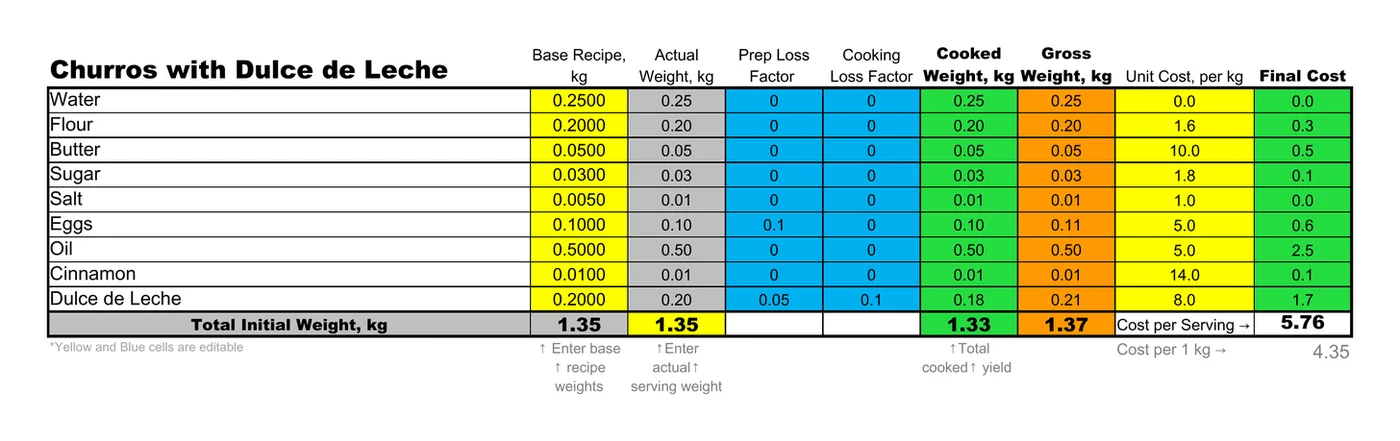
The free Food Cost Card Calculator: churros with dulce de leche, a 1.345 kg batch costed at $5.76, or $4.35 per cooked kilogram.
The card is one recipe, up to twenty ingredients, everything in kilograms and dollars. Four columns do the work that most spreadsheets skip entirely.
- Prep Loss Factor: what you discard before cooking, as a fraction (0.05 is 5%). Shells, peel, stems, fat you trim off. You paid for all of it.
- Gross Weight, kg:
actual weight ÷ (1 − prep loss), the weight you have to buy. The 0.10 kg of egg in the churros carries a 10% prep loss, so the card buys 0.11 kg. - Cooking Loss Factor: the water and fat lost in the pan or on the grill. The dulce de leche loses 10%.
- Cooked Weight, kg:
actual weight × (1 − cooking loss), what is left to serve. That dulce de leche goes in at 0.20 kg and comes out at 0.18 kg.
Each line's Final Cost is gross weight × unit cost per kg, so you pay for what you buy, not for what you plate. The nine churros lines add up to $5.76 for the batch, and the card divides that by the 1.325 kg of cooked weight: $4.35 per kilogram. It also shows where the money goes. The 0.50 kg of frying oil is $2.50, 43% of the batch, and the dulce de leche another $1.68. Sugar and salt together come to about six cents.
One cell turns a batch into a portion. Type a serving weight into the yellow Actual Weight total and every line scales to it. Inside the Menu Engineering Spreadsheet the same churros recipe is set to a 0.23 kg serving, and it costs $0.98, at the same $4.35 a kilogram. A second tab, Nutritional Info, follows the same lines with calories, protein, fat, sugar, carbohydrates, fibre and vitamins A, B1, B2, B3, B6, B9, B12, C, D, E and K, calculated on the cooked weight, and the recipe instructions sit under the card.
There is more on this in what a perfect recipe cost card must include and how to calculate one step by step.
Menu engineering, calculated rather than argued about
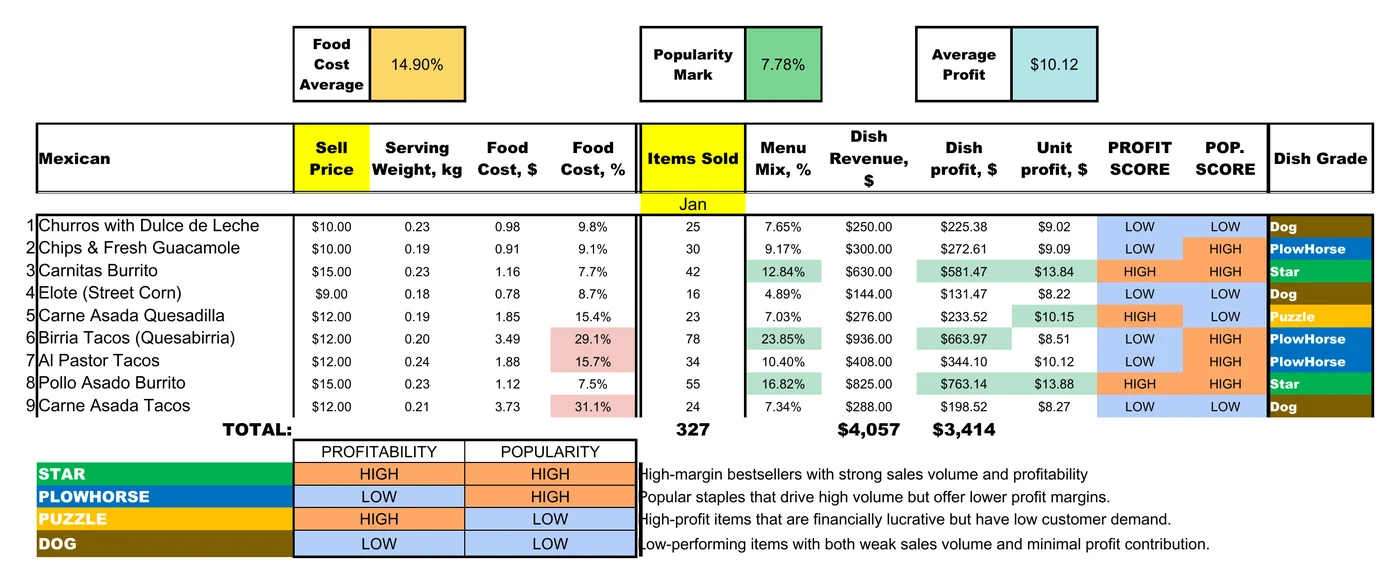
The Menu_Calculation tab pulls each dish's name, serving weight and food cost straight from its own cost card tab. You type two things: the sell price and the items sold in the period. The sheet does the rest: food cost %, menu mix, dish revenue, dish profit ((price − food cost) × items sold) and unit profit (price − food cost).
Two lines then decide where a dish sits. Is its unit profit at or above the Average Profit, the average unit profit across the menu? That is its profit score. Does its menu mix clear the Popularity Mark, (1 ÷ number of dishes) × 70%? That is its popularity score. High on both and it is a Star; high popularity and low profit, a PlowHorse; high profit and low popularity, a Puzzle; low on both, a Dog.
In the worked example nine dishes sold 327 items, so the Popularity Mark is 7.78% and the Average Profit is $10.12. Both lines come from your own numbers, so changing a price or a sales figure can move a dish from one grade to another in front of you. That is the point of it. It also means a grade near a line is a close call: the al pastor tacos make $10.12 a plate too, a fraction of a cent under the average, and that alone makes them a PlowHorse rather than a Star. Stars, Plowhorses, Puzzles and Dogs explained covers what to do with each grade in detail.
Profit per plate, never food cost percentage. The elote runs an 8.7% food cost, one of the lowest on the menu, and it is still a Dog: $8.22 a plate, below the $10.12 average, and only 4.9% of items sold. The birria tacos run 29.1%, close to the highest, and they are the best seller on the menu, 78 of the 327 items, with $663.97 of dish profit, second only to the pollo asado burrito. Judged on food cost % alone, you would cut the wrong dish.
The workbook carries more than the grades. Every dish has its own cost card tab, built exactly like the free calculator, with its nutrition alongside. Menu_Nutritional_Info lists the serving and cooked weight, calories, macros and vitamins of each dish. Product_List gathers the 42 ingredients the menu uses, by category, with the gross weight per serving, the cost per kg and the cost per serving of each. Vendor_Orders is the order list in grams; in the example no supplier is linked yet, so all 39 lines sit under “Unassigned items (not sourced from any vendor)”.
The worked example, in full
Both templates arrive filled in, in kilograms and US dollars. These are the sheets' own calculated outputs, so you can see the whole chain before you replace a single number. First, the churros with dulce de leche on the Food Cost Card Calculator:
| Ingredient | Recipe, kg | Prep loss | Cooking loss | Cooked, kg | Gross (buy), kg | Cost per kg | Final cost |
|---|---|---|---|---|---|---|---|
| Water | 0.250 | 0% | 0% | 0.250 | 0.250 | $0.00 | $0.00 |
| Flour | 0.200 | 0% | 0% | 0.200 | 0.200 | $1.60 | $0.32 |
| Butter | 0.050 | 0% | 0% | 0.050 | 0.050 | $10.00 | $0.50 |
| Sugar | 0.030 | 0% | 0% | 0.030 | 0.030 | $1.80 | $0.05 |
| Salt | 0.005 | 0% | 0% | 0.005 | 0.005 | $1.00 | $0.01 |
| Eggs | 0.100 | 10% | 0% | 0.100 | 0.111 | $5.00 | $0.56 |
| Oil | 0.500 | 0% | 0% | 0.500 | 0.500 | $5.00 | $2.50 |
| Cinnamon | 0.010 | 0% | 0% | 0.010 | 0.010 | $14.00 | $0.14 |
| Dulce de Leche | 0.200 | 5% | 10% | 0.180 | 0.211 | $8.00 | $1.68 |
| Batch | 1.345 | — | — | 1.325 | 1.367 | $4.35 cooked | $5.76 |
Then the whole nine-dish menu in the Menu Engineering Spreadsheet, over one month of sales (the column is headed Jan):
| Dish | Price | Food cost | Food cost % | Unit profit | Sold | Menu mix | Dish profit | Grade |
|---|---|---|---|---|---|---|---|---|
| Churros with Dulce de Leche | $10.00 | $0.98 | 9.8% | $9.02 | 25 | 7.65% | $225.38 | Dog |
| Chips & Fresh Guacamole | $10.00 | $0.91 | 9.1% | $9.09 | 30 | 9.17% | $272.61 | PlowHorse |
| Carnitas Burrito | $15.00 | $1.16 | 7.7% | $13.84 | 42 | 12.84% | $581.47 | Star |
| Elote (Street Corn) | $9.00 | $0.78 | 8.7% | $8.22 | 16 | 4.89% | $131.47 | Dog |
| Carne Asada Quesadilla | $12.00 | $1.85 | 15.4% | $10.15 | 23 | 7.03% | $233.52 | Puzzle |
| Birria Tacos (Quesabirria) | $12.00 | $3.49 | 29.1% | $8.51 | 78 | 23.85% | $663.97 | PlowHorse |
| Al Pastor Tacos | $12.00 | $1.88 | 15.7% | $10.12 | 34 | 10.40% | $344.10 | PlowHorse |
| Pollo Asado Burrito | $15.00 | $1.12 | 7.5% | $13.88 | 55 | 16.82% | $763.14 | Star |
| Carne Asada Tacos | $12.00 | $3.73 | 31.1% | $8.27 | 24 | 7.34% | $198.52 | Dog |
| Whole menu | — | — | 14.9% avg | $10.12 avg | 327 | 100% | $3,414.19 | — |
One month of that menu brings in $4,057 from 327 items against $642.81 of food, and leaves $3,414.19 of dish profit to pay labour, commissary, fuel and you. The sheet's Food Cost Average of 14.9% is the plain average of the nine dishes; weighted by what actually sold, food is 15.8% of sales, because the best seller is also one of the dearest dishes to make.
Look at where the money comes from. The two Stars, both burritos, earn 39.4% of the dish profit from 29.7% of the items sold. The three PlowHorses earn 37.5%, the one Puzzle 6.8%, and the three Dogs 16.3%. That split, not the menu's average food cost, is what tells you where to spend your next hour.
The business plan itself: a finished example to view
The cost cards and the menu are the foundation. The plan built on top of them adds the crew, the monthly costs, the equipment and the funding, and turns it all into break-even, profit and a twelve-month cash line.
That part is not a free download. You can view a complete example: a business plan the FoodTech.Guru app generated for a Mexican food truck. It is view-only with the formulas hidden, so you see every tab and every number exactly as yours would look, without a copy of someone else's model to type over. When you want your own, the app generates it from your recipes in about a minute.
Controls
Format, currency, venues, trading days, crew, monthly base, delivery channels and targets in one place.
Unit Economics
One steady month: profit, prime cost, break-even, payback and a health check with what to fix.
Cash Flow
Twelve months with a sales ramp, CAPEX and funding, and the lowest cash point you must survive.
Menu Engineering
Every dish classed Star, Plowhorse, Puzzle or Dog by margin and popularity.
Cost Cards
Every dish's cost card: ingredients, gross weights, prep and cooking loss, cost per portion.
Purchase List
Your buying list, totalled across the menu in gross weight and grouped by category.
Startup Costs
One-off money with estimated, actual and variance columns, plus how it is funded.
How to use it
Get the two templates
Leave your email in the popup and open both. In Google Sheets, make your own copy; in Excel or Numbers, save the file somewhere you will find it again.
Cost one dish per card
Name the dish, list each ingredient with its recipe weight in kg and its cost per kg, then the prep loss and cooking loss as fractions (0.1 is 10%). Measure the losses once on a real batch; do not inherit someone else's numbers.
Set the serving weight
Type the weight of one serving into the Actual Weight total. Every line scales to it, and the card shows the cost per serving and the cost per cooked kilogram.
Price the menu and add the sales
In the Menu Engineering Spreadsheet each dish reads its food cost from its own cost card tab. Enter its sell price, then the items sold in the same period from your POS sales mix report.
Read the grades
Protect the Stars. Work on the PlowHorses' cost before you touch their price, promote the Puzzles before you discount them, and decide whether each Dog has a job to do.
Look through the example plan
See how cost cards and menu engineering feed a finished plan: unit economics, cash flow, purchase list and startup costs.
Generate your own plan
In the FoodTech.Guru app, answer six questions about format, crew, menu, monthly costs and equipment. Your live Google Sheet arrives in about a minute.
Using it for a food truck business plan
The worked example is a Mexican street-food menu of tacos, burritos, quesadillas, elote and churros, the kind a taco truck runs, which makes this the shortest path if that is what you are opening. Three things differ from a bricks-and-mortar plan:
- Packaging is a real line, not an afterthought. These cost cards cover food only. Every taco boat, foil wrap and napkin comes out of the same plate's profit, so cost it per serving and take it off the unit profit before you decide a dish pays its way: on the carne asada tacos, $8.27 a plate before packaging, labour, fuel and commissary.
- Rent becomes pitch fees, fuel and commissary rent. The same line, a different name, and usually a lower and lumpier number. Generator fuel belongs in utilities.
- The truck itself dominates the investment. The vehicle and its fit-out are most of the startup money, which is why payback and the working-capital buffer matter more than they would in a small cafe. The generated plan's Startup Costs and Cash Flow tabs carry those numbers.
Swap the tacos for loaves and the same cost card works for a bakery. Cost by the event portion instead of the menu plate, and it works for catering. The costing math never changes.
What to write around the numbers
The templates and the generated plan are the financial half of a business plan. It is the half that gets tested. The written half is yours, and it is far easier to write once the numbers exist: a lender who can see your prime cost and your break-even reads the rest of the document differently.
A workable outline for the pages around the spreadsheets:
- Concept: one line. If you cannot say it in one line, the menu is not decided yet.
- The problem you solve for a specific customer: where they are, when they are hungry, what they currently do instead.
- Market and location: footfall pattern, competition within walking distance, the days and hours that actually sell.
- Menu: the five to twelve items, and why each one is on there. The menu engineering sheet is your evidence.
- Operations: kitchen, suppliers, delivery days, staffing, service flow at peak.
- Marketing: how the first hundred customers find you, and how they find you again.
- Team: who does what, and what happens when one of you is ill.
- Financials: the tabs of your generated plan go straight into the appendix, with the cost cards and menu engineering as backup.
- Risks and what you would do: a slow first quarter, a supplier price rise, a site that closes.
The part nobody warns you about: keeping it current
A cost card is accurate on the day you fill it in. Then a supplier sends a new price list, and it is a little bit wrong. Then another does, and it is wrong enough to matter.
In most kitchens the price list gets retyped once, in month one, and never again, because typing four hundred lines from a supplier PDF is nobody's Tuesday morning. Six months later every cost card is out of date and nobody knows by how much.
Upload the vendor file as it arrives. Product matching, pack sizes and units are handled, and every cost card reprices behind it.
That is the job FoodTech.Guru takes over. You upload the supplier file as it arrives (CSV, XLS or XLSX) and it matches "CHKN THGH BNLS 5KG" to your "Chicken thigh, boneless", normalises the pack sizes so you are not comparing a case to a kilogram, and reprices every recipe and menu behind it. The vendor price-list workflow is implemented and currently in field testing with operators.
Questions people ask first
Are the cost card and menu engineering templates really free?
Yes. Leave your email address and you get both, a Food Cost Card Calculator and a Menu Engineering Spreadsheet, as your own editable copies. There is nothing to pay, and you can copy, edit and share them with your team or your accountant.
Why is the business plan example view-only?
The example is a finished plan that the FoodTech.Guru app generated for a Mexican food truck. It is there so you can see what a complete plan looks like: every tab and every number. The formulas are hidden because the live model is what the generator builds for you, from your own recipes, crew and costs. Another truck's numbers would not be your plan anyway.
How do I get my own business plan?
Generate it in the FoodTech.Guru app on iOS. Answer six questions about your format, crew, menu, monthly costs and equipment, and the app builds a live Google Sheet from your costed recipes: unit economics, break-even, a 12-month cash flow, menu engineering, cost cards, a purchase list and startup costs.
Do the templates work in Google Sheets and Excel?
Yes. Both are Google Sheets exported as ordinary .xlsx files with live formulas, so they open in Google Sheets, Excel, Numbers and LibreOffice. Yellow and blue cells are where you type; the other cells calculate.
Can I use them for a food truck, bakery, catering business or cafe?
Yes. The costing math is the same for any food business: what you pay per kilogram, how much the recipe uses, and what it loses in prep and cooking. The worked example is a Mexican menu; type over it with your own dishes, weights and prices.
What is gross weight, and why does it change my food cost?
Gross weight is what you have to buy to end up with the weight the recipe uses, once prep loss is taken off. On the churros card, 0.20 kg of dulce de leche with a 5% prep loss means buying 0.21 kg, and the card costs the 0.21 kg. Cooking loss works on the other side: it does not change what you buy, it shrinks what you serve, from 0.20 kg to 0.18 kg here, so the cost per kilogram is worked out on the cooked weight. Leave either loss out and the food cost comes out too low.
What food cost percentage should I aim for?
Many quick-service and food-truck menus aim for roughly 28 to 32 percent, and most independents target somewhere between 28 and 35. The menu engineering sheet shows the food cost percentage of every dish and the average across the menu; in the worked example the dishes run from 7.5 to 31.1 percent. The more predictive number is prime cost, food plus labour, which should stay under about 65 percent; the generated business plan tracks it for you.
How do I calculate break-even for a food business?
Divide your monthly fixed costs by your contribution margin ratio, the share of every dollar of sales left after the variable cost of making the food. Then turn the result into portions per trading day, because that is the version of the number you can judge while standing at your pitch. The business plan the app generates does both for you.
Does the plan include the written sections of a business plan?
No. The templates and the generated plan cover the financial side, the part a lender or a landlord will test. The written sections are yours, and this page has a short outline of what to write around the numbers.
Do I need the app to use the free templates?
No. Both templates are complete and work on their own. You only need the app to generate a business plan of your own, or to build cost cards from a recipe photo instead of typing them.
From two sheets to a whole plan
A spreadsheet is the right tool for your first few dishes. It stops being the right tool at about the point where re-costing everything after a price change takes an evening instead of ten minutes, and where the plan needs crew, rent, equipment and a cash line on top of the menu.
FoodTech.Guru builds the same cost cards, with the same prep and cooking loss math, from a photo, a typed recipe, a voice note or a social-video link, and runs menu engineering on them automatically. Then its business plan generator turns the costed menu into a live Google Sheet business plan.
Costed your first dishes?