
Menu Engineering Worksheet (Free Spreadsheet)
This menu engineering worksheet sorts every dish into Star, Plowhorse, Puzzle or Dog from its sales and profit. Enter each dish's price, food cost and items sold; the spreadsheet works out menu mix, unit and dish profit and the grade. It comes with a real nine-dish food-truck menu already graded.
Free, no signup, no email. Works in Google Sheets, Excel, Numbers and LibreOffice. Preview it first.
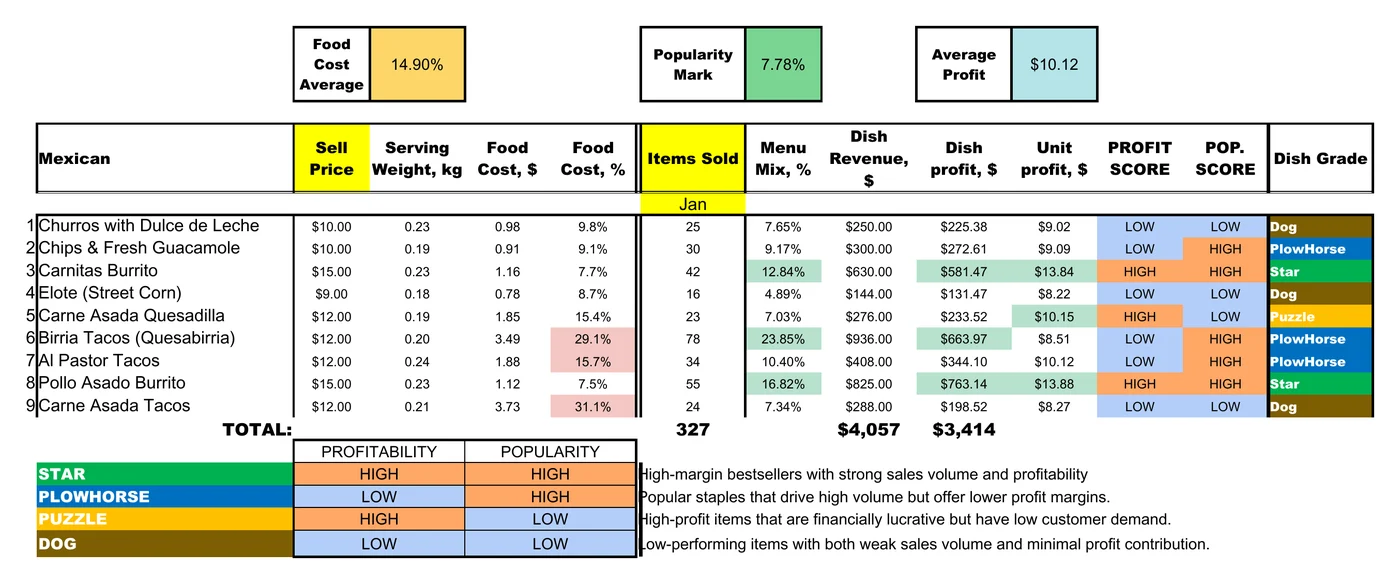
How the menu engineering matrix works
Each dish gets two marks. Profit is high when its unit profit (price − food cost) is at or above the menu's average. Popularity is high when its share of items sold is at least 70% of an equal share: with nine dishes, 70% × 1/9 = 7.8%.
Star
Keep it, feature it, protect the recipe.
Plowhorse
Sells well, earns little: trim the cost or raise the price a little.
Puzzle
Earns well, sells slowly: move it up the menu or rename it.
Dog
Rework it or take it off.
Fill in the worksheet
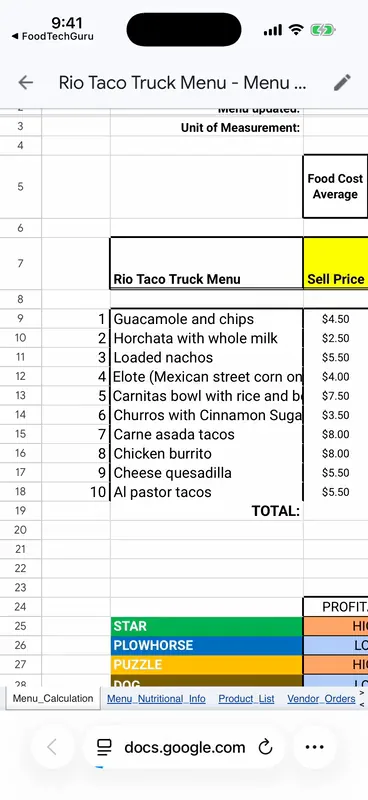
- Make a copy and open the Menu_Calculation tab.
- Put one dish per row, up to 20, with its sell price.
- Add the food cost per serving. In the example it comes from each dish's own cost card tab; you can link yours or type it.
- Type the items sold for the period in the yellow column.
- Read the grade and the averages at the top: food cost %, popularity mark and average profit.
Try it: grade your menu here
The same rules as the spreadsheet, in your browser. Edit any number, add dishes or start from scratch.
| Dish | Price | Food cost | Sold | Unit profit | Menu mix | Grade | Remove |
|---|
Skip the typing
Generate it from your menu
FoodTechGuru makes this exact spreadsheet from your own dishes. Snap or paste each recipe to get its cost card, put the dishes in a menu, and the app builds the Google Sheet: food cost %, menu mix, unit and dish profit, the Star to Dog grades, and a product list.
- Free download; new accounts get 15 free credits (one recipe = one credit)
- The menu sheet itself uses 5 credits on a Pro or Guru plan
- iPhone today, Android coming


Menu engineering worksheet FAQ
Is the menu engineering worksheet free?
Yes. Make a copy in Google Sheets or download the .xlsx. There is no signup and no email required.
What counts as a popular dish?
A dish whose share of items sold is at least 70% of an equal share. With 10 dishes the line is 7%; with 20 it is 3.5%.
Is the profit line a weighted average?
No. The worksheet compares each dish with the simple average unit profit of the menu. The classic Kasavana-Smith method weights that average by items sold, so the two can disagree for dishes close to the line.
How often should I re-run it?
Monthly works for most menus, and after any price or recipe change. Use sales from the same period for every dish.
Does it work in Excel?
Yes. The .xlsx opens in Excel, Numbers and LibreOffice with the formulas intact.
Can an app do menu engineering for me?
Yes. FoodTechGuru for iPhone builds this spreadsheet from your costed dishes as a Google Sheet. The menu sheet uses 5 credits on a Pro or Guru plan.
New free templates, by email
Optional. Leave your email and we'll let you know when we add a new free template or costing tip.
Thanks, you're on the list.
Grade your whole menu in one sheet
Google Sheets or Excel. Free, with a real menu already filled in.
Make a copy in Google Sheets