
Recipe Costing Software
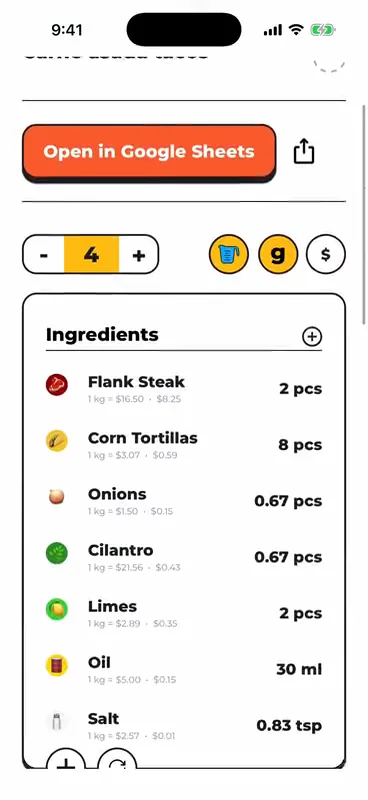
FoodTechGuru is recipe costing software that builds a cost card for every recipe and keeps it in a live Google Sheet. Snap a photo of the recipe, paste a link or dictate it, and the app prices every ingredient, accounts for yield and gives you the cost per serving.
How it works

- Add the recipeType it, snap a photo, record a voice note or paste an Instagram, TikTok, YouTube or web link. Paid plans cost up to 10 at once.
- Get the cost cardEvery ingredient priced, gross and net weights, cost per serving.
- Build the menuA menu sheet with food cost %, profit per dish and Star, Plowhorse, Puzzle, Dog.
- Plan the businessA live Google Sheet business plan with break-even and 12-month cash flow.
What it costs per serving (yield, waste, labour)
- Yield and waste: prep-loss and cooking-loss coefficients turn the net weight in the recipe into the gross weight you buy.
- Cost per serving: change the servings and every number updates.
- Labour, utilities and packaging: optional lines on top of food cost.
- Margin: type your selling price and units sold to see revenue, profit and margin %.
Every card is a Google Sheet
Each recipe gets a Google Sheet with a Technical Card tab (ingredients, weights, losses, costs) and a Nutritional Info tab with calories, macros and vitamins from USDA data. Share it with your team, print it or keep editing.
Price lists and menus
Prices come from a built-in ingredient base for your country: 16 countries, 13 currencies. Type your own price on any line, or re-sync prices later. Group recipes into a menu and get a menu engineering sheet with a product list for ordering.
Recipe costing software vs a spreadsheet
| Spreadsheet | FoodTechGuru | |
|---|---|---|
| Entering a recipe | Type every line | Photo, voice, text or link |
| Ingredient prices | You look each one up | Price base for your country, editable |
| Yield and loss | You build the formulas | Built into every line |
| Menu analysis | A second workbook | One menu sheet from your cards |
| Cost | Free | Free to start, then a plan |
If you cost a few recipes a year, a spreadsheet is fine. Our free recipe cost calculator does the same maths in your browser. The app is for kitchens that cost recipes every week.
Plans and platforms
Free to start
Free download and 15 credits. One recipe uses one credit.
Paid plans
Enthusiast, Professional and Guru, billed in the App Store. Menus hold up to 5 dishes on Enthusiast, 10 on Professional and 20 on Guru.
Business plans
50 credits per plan on a paid Professional or Guru plan.
Who uses it: chefs, food trucks, cafés, caterers, bakeries, ghost kitchens and food technologists. The app speaks 13 languages and works in metric or imperial units.
Free download
Cost your first 15 recipes free
- Cost card and Google Sheet for every recipe
- Ingredient prices for your country, yield and cooking loss
- iPhone today, Android coming

Recipe costing software FAQ
Is there a free version?
The download is free and new accounts get 15 credits. One recipe uses one credit, so you can cost 15 recipes before choosing a plan.
Does it work on Android or a computer?
The app is on iPhone today and Android is coming. Every cost card is also a Google Sheet, so you can open and edit it on any computer.
Where do the ingredient prices come from?
From a built-in price base for your country (16 countries, 13 currencies). If an ingredient is missing, the AI estimates a price. You can type your own price on any line.
Does it handle yield and cooking loss?
Yes. Every line carries a prep-loss and a cooking-loss coefficient, so the card shows the gross weight you buy, the net weight you use and the weight after cooking.
Can I change a cost card after it is made?
Yes. Edit amounts, prices and loss coefficients in the app, change the number of servings, or work in the Google Sheet.
Stop typing recipes into spreadsheets
Snap the recipe, get the cost card and the Google Sheet.
Download free on iOS