
Recipe Cost Calculator
Use this recipe cost calculator to add ingredients, pack sizes and prices, and get the recipe cost and cost per serving. It's free, needs no signup and runs in your browser. Yield % accounts for trimming and peeling, so you cost what you buy, not just what lands on the plate.
Calculator
Per serving —Recipe —All results ↓Same recipe, no typing
Skip the typing: recipe photo to cost card
Snap a photo, paste a recipe link from Instagram, TikTok or YouTube, or dictate the recipe. FoodTechGuru builds this cost card for you, with ingredient prices for your country, prep and cooking loss, and a Google Sheet you can edit.
- New accounts get 15 free credits; one recipe uses one credit
- Cost per serving, margin at your price, and nutrition per recipe
- iPhone today, Android coming

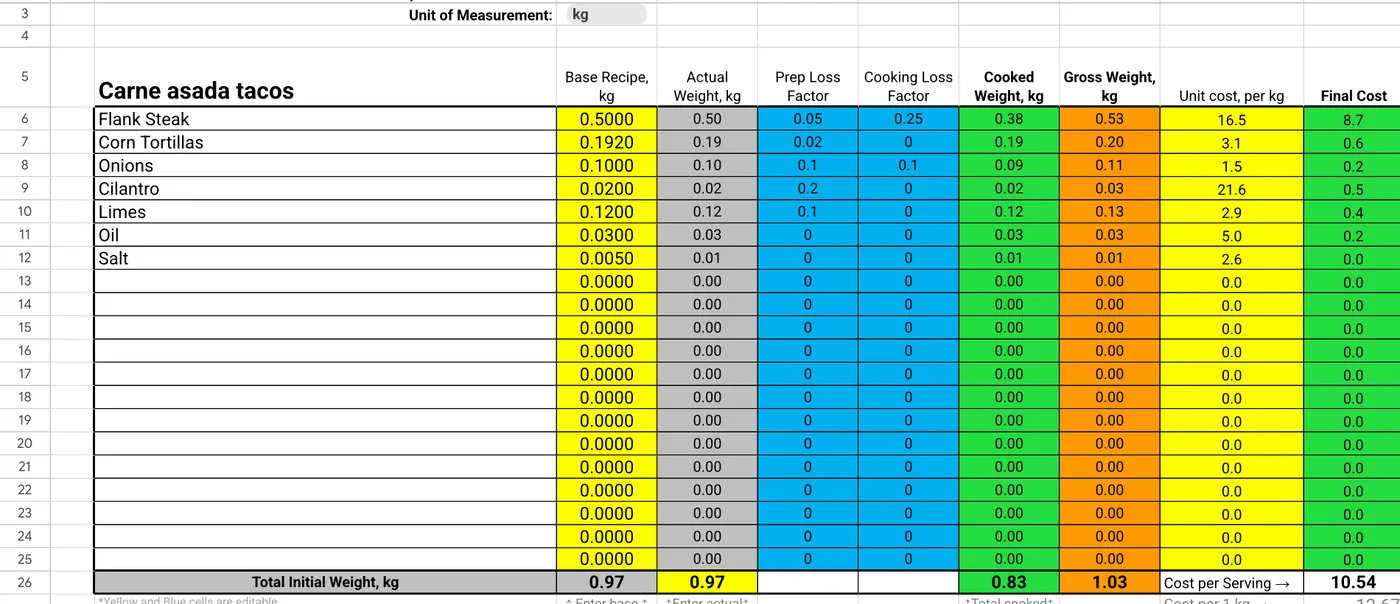
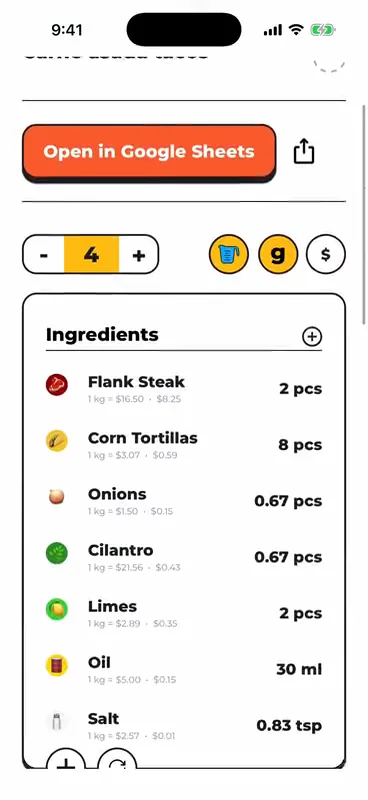
How to calculate recipe cost
- List every ingredient with the amount the recipe uses, after cleaning.
- Add the pack you buy: its size and what you pay for it.
- Set the yield %, the share left after trimming or peeling.
- Cost each line: amount used ÷ yield ÷ pack size × pack price.
- Add the lines up for the recipe cost.
Example: flank steak comes in a 2 lb pack for $14.97. The recipe uses 500 g at 95% yield, so you buy 526 g (1.16 lb). That line costs $8.69.
Cost per serving and food cost %
Cost per serving = recipe cost ÷ servings. Food cost % = cost per serving ÷ menu price × 100. To price from a target, divide the cost per serving by the target: $2.63 ÷ 0.30 = $8.78.
Labour, packaging and overhead don't belong in food cost %, but they do cut your profit. Add them in the optional section to see the profit per serving after everything.
Recipe cost calculator FAQ
Is this recipe cost calculator free?
Yes. It is free, needs no signup and runs in your browser. Your numbers are not sent anywhere.
What is yield % and why does it change the cost?
Yield is the share of what you buy that ends up in the dish after trimming, peeling or deboning. If flank steak yields 95%, 500 g in the recipe means you buy about 526 g, and you pay for all of it.
Can I buy in pounds and cook in grams?
Yes. The calculator converts between g, kg, oz and lb, and between ml, l, fl oz, cups, tablespoons and teaspoons. Weight and volume can't be mixed on one line, because that needs the ingredient's density.
What food cost percentage should I aim for?
Many operators aim for roughly 25–35% depending on the concept. Set your own target and the calculator suggests the menu price that hits it.
Does it include cooking loss?
Cooking loss changes how much cooked food you get, not what you pay, so the cost here uses prep yield only. The FoodTechGuru app tracks both prep loss and cooking loss on every cost card.
Can an app cost my recipes for me?
Yes. In FoodTechGuru for iPhone you snap a photo, paste a recipe link or dictate the recipe, and it builds the cost card with ingredient prices for your country plus a Google Sheet. New accounts get 15 free credits; one recipe uses one credit. Android is coming.
Cost your whole menu without typing
Photograph the recipe, get the cost card and the Google Sheet.
Download free on iOS