
Recipe Costing Template (Free Google Sheet)
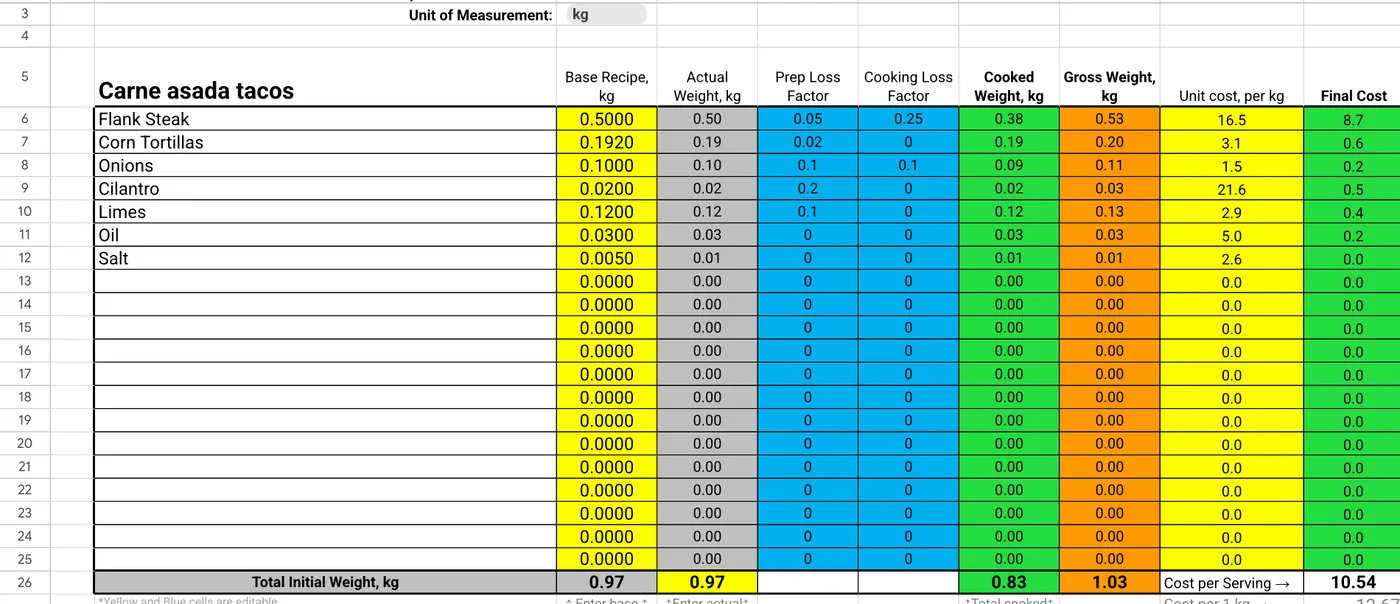
This recipe costing template is a free Google Sheet for ingredient costs, yield and cost per serving. Type each ingredient's weight, its prep and cooking loss and what you pay per kg, and the sheet works out what you buy, what you serve and what one serving costs.
Free, no signup, no email. Works in Google Sheets, Excel, Numbers and LibreOffice. Preview it first.
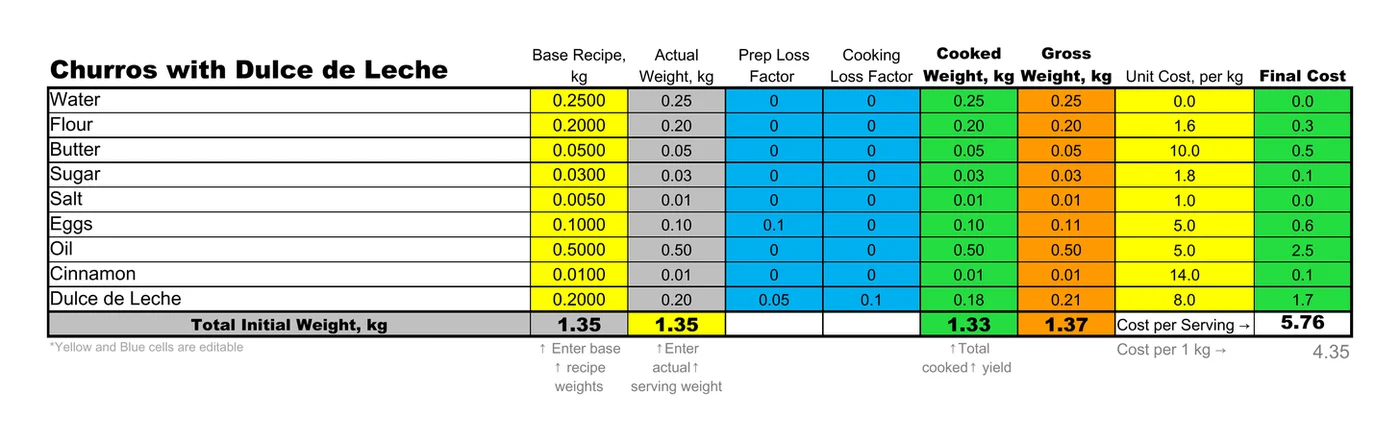
What's in the template
One tab is the Technical Card, the cost card itself. The second, Nutritional Info, picks up the same ingredients and weights; its calories and macros per 100 g belong to the example, so update them when you swap ingredients. The cost card columns:
- Base recipeNet weight of each ingredient in the recipe.
- Actual weightThe recipe scaled to the serving weight you set.
- Prep lossShare trimmed or peeled before cooking.
- Cooking lossShare that cooks off.
- Cooked / gross weightWhat you serve, and what you have to buy.
- Unit costYour price per kg.
- Final costGross weight × unit cost, then cost per serving and cost per kg.
How to fill it in
- Make a copy (or download it) and rename the dish in the top-left cell.
- Type the ingredients and their recipe weights in the yellow column, in kg.
- Set the serving weight in the yellow total cell under Actual Weight.
- Add prep and cooking loss in the blue cells: 0.1 means 10%.
- Enter what you pay per kg. Cost per serving and cost per kg fill in at the bottom.
Only the yellow and blue cells need typing. In the example, eggs carry a 10% prep loss, so 100 g in the recipe means buying about 111 g, and the card charges you for all of it.
Same sheet, no typing
Get it filled from a recipe photo
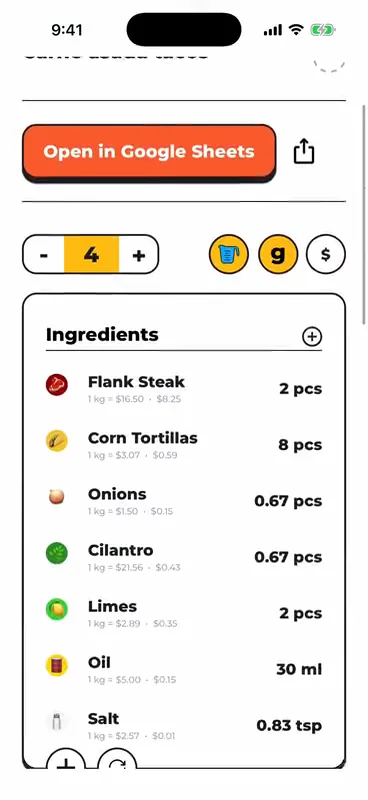
Snap a photo of the recipe, paste a link from Instagram, TikTok or YouTube, or dictate it. FoodTechGuru builds this same cost card with ingredient prices for your country, prep and cooking loss, and nutrition, and saves it as a Google Sheet.
- Free download; new accounts get 15 free credits
- One recipe uses one credit
- iPhone today, Android coming

Recipe costing template FAQ
Is this recipe costing template free?
Yes. Make a copy in Google Sheets or download the .xlsx. There is no signup and no email required.
Does it work in Excel?
Yes. The .xlsx opens in Excel, Numbers and LibreOffice with the formulas intact. The Google Sheets copy is the same file.
What are prep loss and cooking loss?
Prep loss is what you trim or peel before cooking; it raises the gross weight you buy. Cooking loss is what cooks off; it lowers the cooked weight you serve.
Cost per serving or cost per kg?
Cost per serving is the total cost of the weights you entered. Cost per kg divides it by the cooked weight, which helps when you sell by weight or scale a batch.
Would a calculator be quicker?
For one dish, maybe: the free recipe cost calculator takes pack sizes and prices in pounds or grams and needs nothing installed.
Can an app fill it in for me?
Yes. FoodTechGuru for iPhone turns a recipe photo, link or voice note into this cost card with prices for your country. New accounts get 15 free credits; one recipe uses one credit.
New free templates, by email
Optional. Leave your email and we'll let you know when we add a new free template or costing tip.
Thanks, you're on the list.
Your recipe costing template, ready to copy
Google Sheets or Excel. Free, with the formulas already in.
Make a copy in Google Sheets