
Restaurant Order Guide Template (Free Excel)
This restaurant order guide template is a free Excel sheet that turns par levels and on-hand counts into the cases to order from each supplier and what they cost. List what you buy once, count the shelf before each order, and the sheet rounds up to whole cases, totals each supplier and lays out a purchase order you can print or send.
Free, no signup, no email. Opens in Excel and LibreOffice; for Google Sheets, upload it to Drive and open it there.
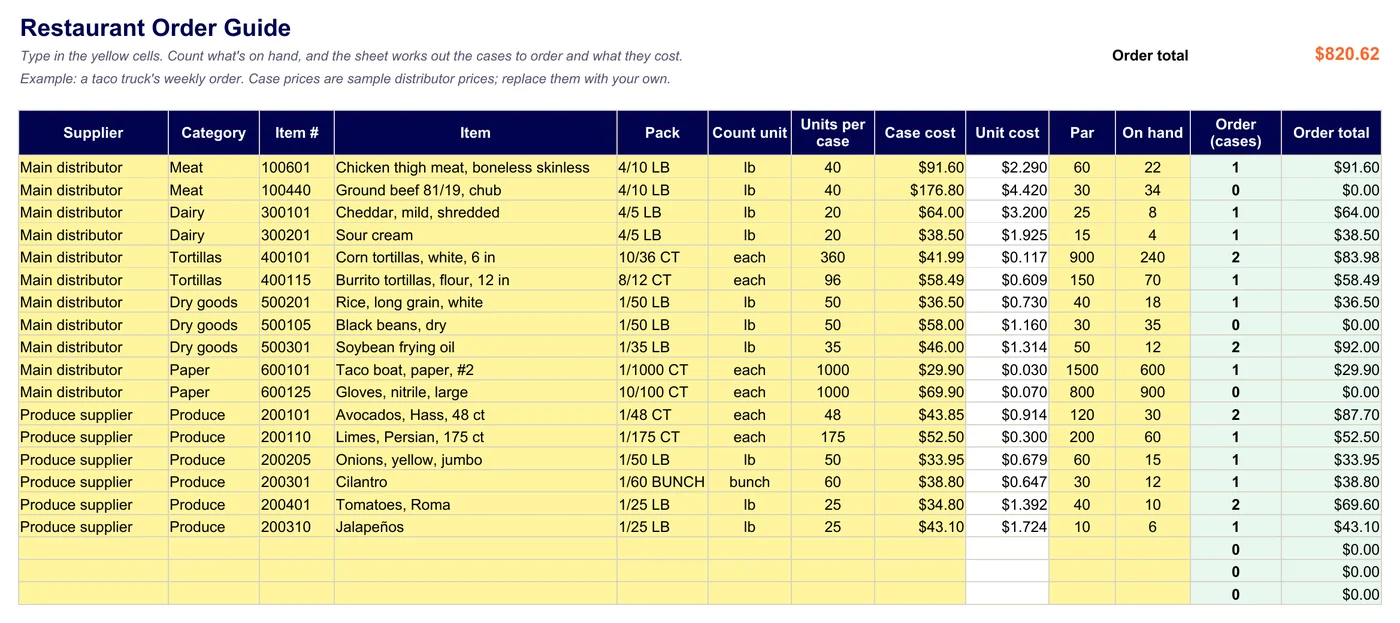
What's in the order guide
Four tabs: the Order Guide itself, Suppliers (lines and total per supplier), a Purchase Order for the supplier you pick, and How to use. The order guide columns:
- Supplier and itemWho you buy it from, the category and their item number.
- Pack and units per case4/10 LB is 40 lb; 10/36 CT is 360 pieces.
- Case costFrom the price list or the last invoice. Unit cost follows.
- ParWhat you want on the shelf after the delivery.
- On handWhat you counted before ordering.
- Order (cases)Par minus on hand, divided by the case size, rounded up.
- Order totalCases × case cost, per line, per supplier and overall.
How to use it each week
- List each item once: supplier, pack, units per case and case cost.
- Set a par from a normal week's use between deliveries, plus a small buffer.
- Count the shelf before each order and type On hand.
- Read Order (cases). In the example, the truck is 4 lb short on jalapeños, so it orders one 25 lb case.
- Open Purchase Order, pick the supplier, and print it or save it as a PDF to send.
Only the yellow cells need typing. In the example the main distributor's order comes to $494.97 and the produce supplier's to $325.65.
Try it here: a mini order guide
Eight lines from the template's example. Change the par or what's on hand and the cases update, the same way the sheet does.
| Item | Supplier | Units per case | Case cost | Par | On hand | Order (cases) | Total | Remove |
|---|---|---|---|---|---|---|---|---|
| 1 | $43.10 |
Guru plan · free trial included
Real supplier prices from the app
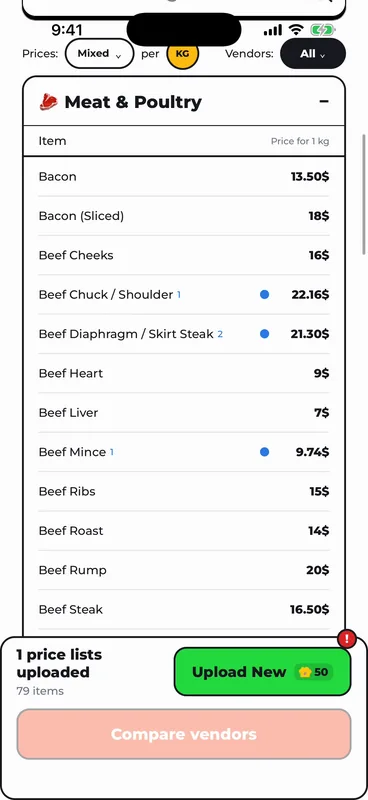
Case costs are only as good as the last price list. In FoodTechGuru for iPhone, upload your supplier's price list as a CSV or Excel file: the AI matches every line to your ingredients and works out the price per kilo, and the cost cards you make use it.
Order drafts, Guru only: the app can also prepare orders from a menu. It adds up each ingredient across the recipes and portions, adds prep loss, rounds up to whole packs from your supplier lists and makes one order per supplier, as a CSV you share from your phone. 5 credits, charged only when an order is made. It doesn't send orders to suppliers or track par and on hand; that part is this template's job.
- 50 credits per price list, refunded if the upload fails
- Up to 4 suppliers on the Guru plan
- iPhone today, Android coming

Restaurant order guide FAQ
Is this restaurant order guide template free?
Yes. Download the .xlsx; there is no signup and no email required.
What's the difference between an order guide and a purchase order?
The order guide is your standing list of everything you buy, with a par for each item. A purchase order is one order to one supplier. The template does both: its Purchase Order tab builds each supplier's order from the guide.
What is a par level?
The amount of an item you want on the shelf after a delivery, enough to last until the next one.
How do I set par levels?
Start from what you use between two deliveries in a normal week, add a small buffer for a busy day, and adjust after a few orders.
Why does it round up to whole cases?
Most suppliers sell by the case. If yours splits cases, type the split size as Units per case.
Does it work in Google Sheets?
Yes. Upload the file to Google Drive and open it with Google Sheets. The formulas use SUM, SUMIF, COUNTIFS, ROUNDUP, INDEX and MATCH, which Excel, Google Sheets and LibreOffice all support.
Do I need restaurant purchasing software instead?
A spreadsheet is enough when one person orders from a few suppliers. Purchasing software adds things like online ordering and invoice matching. FoodTechGuru is not purchasing software: it puts your suppliers' price lists into your recipe costs, and on the Guru plan it prepares per-supplier order CSVs from a menu.
Choosing between two suppliers? Compare them per pound with the free vendor price comparison calculator.
New free templates, by email
Optional. Leave your email and we'll let you know when we add a new free template or costing tip.
Thanks, you're on the list.
Your order guide, ready to fill in
Excel or Google Sheets. Free, with the formulas already in.
Download the .xlsx