
Food Cost Template (Free Weekly Tracker)
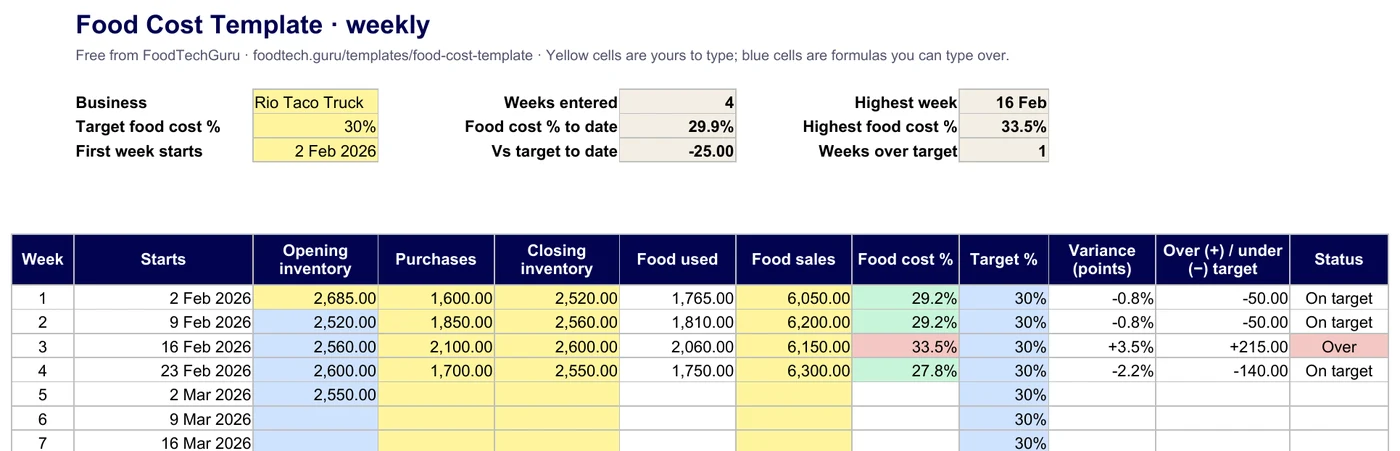
This food cost template tracks your actual food cost % week by week: opening inventory plus purchases minus closing inventory, divided by food sales, against your target. It shows the variance in points and in money, so a bad week stands out before the month closes.
Free, no signup, no email. Weekly and monthly tabs. Works in Excel, Google Sheets (File → Import), Numbers and LibreOffice.
Looking for what each dish should cost? Use the recipe costing template for one recipe, or the menu costing template for the whole menu.
What the food cost template tracks
Food cost % = (opening inventory + purchases − closing inventory) ÷ food salesCount food at what you paid for it. Use sales before tax.
- Opening inventoryType it once. Every later week opens with the last closing count.
- PurchasesFood bought that week: every invoice and cash buy.
- Closing inventoryThe count at the end of the week.
- Food used and food cost %Worked out for you, with the to-date total.
- VariancePoints above or below your target, and the money: food used − target × sales.
- Weekly and monthly52 weeks from your start date, and 12 months on their own tab.
Try it: your last four weeks
The same maths as the Weekly tab. Type your counts, purchases and sales.
| Week | Purchases | Closing count | Food sales | Food used | Food cost % | Vs target | Status |
|---|
Just one number for one period? The food cost percentage calculator does a single week or month.
How to fill it in
- Set your target food cost % and the date your first week starts.
- Count your food at cost and type it as the opening inventory.
- Each week, add up the food invoices, count again, and type the purchases, the closing count and the food sales.
- Read the status. A red week is over target; the money column says by how much.
- Find the cause of a red week: waste, portions, a price rise, or a delivery that landed just before the count.
Actual vs what it should be
Know what your food cost should be
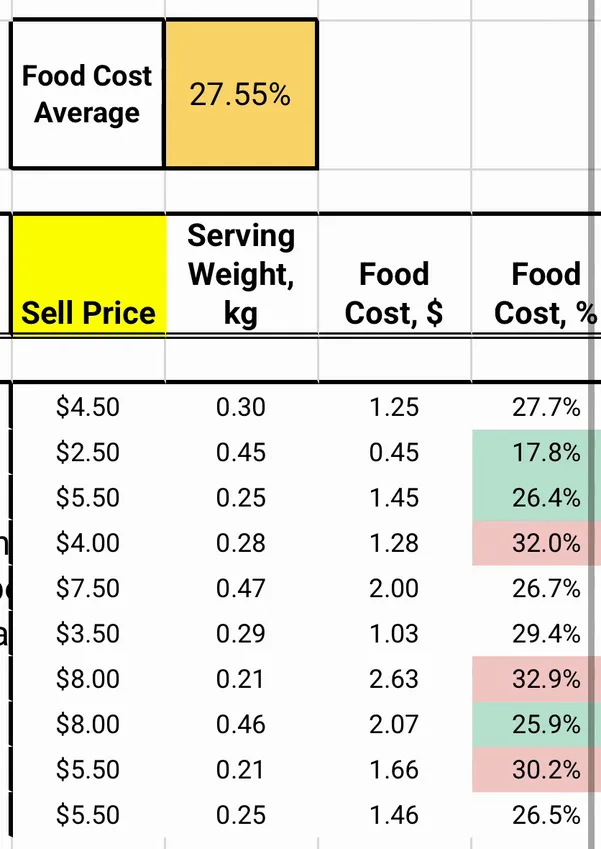
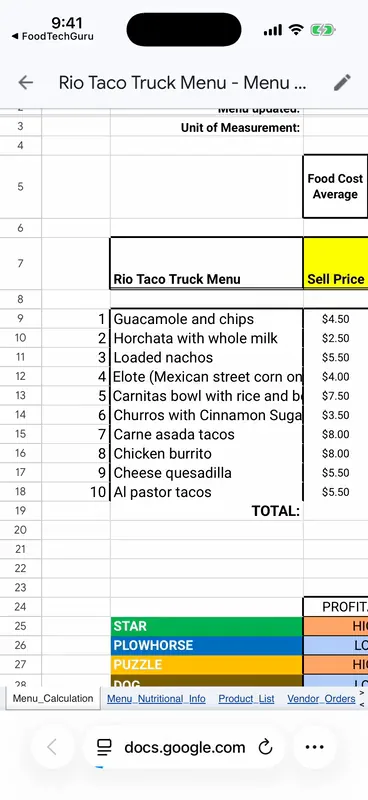
The tracker shows what you spent. To see what you should spend, cost the menu: snap a photo of each recipe in FoodTechGuru, and the app prices every ingredient for your country and builds a menu Google Sheet with each dish's food cost % and the menu's average. If your actual % sits well above that, the gap is waste, portions or prices.
- Free download; each recipe uses 1 credit
- The menu sheet uses 5 credits on a Pro or Guru plan
- On iPhone

Food cost template FAQ
Is the food cost template free?
Yes. Download the .xlsx; there is no signup and no email. It works in Excel, Google Sheets, Numbers and LibreOffice.
How do you calculate food cost for a week?
Food used = opening inventory + purchases − closing inventory. Divide it by the week's food sales before tax. 1,765 used on 6,050 of sales is 29.2%.
Why does my food cost % jump from week to week?
Usually timing: a big delivery that lands just before a count makes one week look cheap and the next one dear. Watch the to-date figure as well as single weeks, and count at the same time each week.
What should I count as inventory?
Food on hand at what you paid for it: walk-in, freezer, dry store and the line. Leave out drinks, packaging and cleaning supplies, or track them on their own.
Weekly or monthly?
Both are in the file. Weekly catches a problem while you can still fix it; monthly lines up with your accounts.
Is this the same as a recipe costing template?
No. A recipe or menu costing template works out what each dish should cost. This template measures what you actually spent. Use both: the gap between them is waste, over-portioning or prices that went up.
New free templates, by email
Optional. Leave your email and we'll let you know when we add a new free template or costing tip.
Thanks, you're on the list.
Know your real food cost every week
Excel or Google Sheets. Free, weekly and monthly.
Download the template (.xlsx)