
Download App

Business-plan creation · Restaurant format

Restaurant Business Plan

Restaurant business plan creation starts with the menu you will actually sell. FoodTechGuru turns your costed recipes, selling prices, crew, monthly costs and equipment into a financial Google Sheet.

Create your business plan
Existing business-plan creation tutorial · food-truck scenario

Open a real finished business plan

Your plan should look like a working business. See one.

Explore the actual Google Sheet generated by FoodTechGuru: the menu, operating costs, break-even and first year of cash, connected in one workbook.

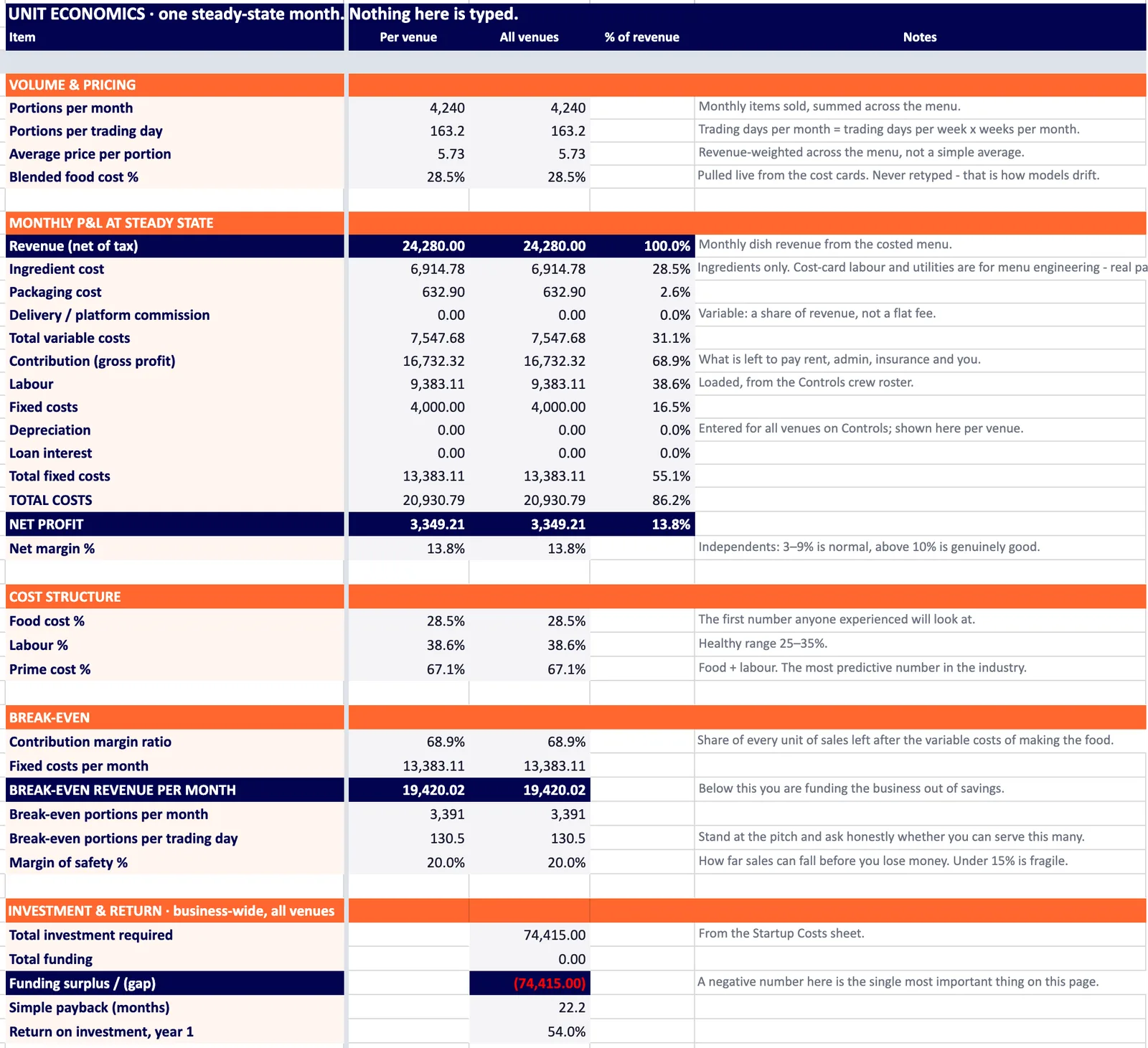
Actual Rio Taco Truck business-plan Google Sheet, showing its Unit Economics tabOpen the real business-plan Google Sheet ↗
Rio Taco Truck · existing view-only food-truck example. It demonstrates the workbook you receive; its figures are not a forecast for your restaurant.

From idea to numbers you can inspect

What goes into a restaurant business plan?

A business plan connects what you sell, who you sell it to and how you operate with the money needed to open and keep trading. Describe your concept, customers and sales approach; use FoodTechGuru to build the financial model behind those choices.

Use the Restaurant format to build the numbers behind a dine-in, takeaway or mixed-service concept, then review the workbook before you commit to the opening.

What lands in your Google Drive

Seven tabs. 1,826 live formulas. Zero blank cells to fill.

Not a PDF that goes stale. The plan is a working spreadsheet model — yellow cells are your inputs, everything else is a formula. Change a price, and break-even, profit and cash flow follow.

The robot chef typing on a laptop on top of a giant spreadsheet
  1. 1

    Controls

    Every setting in one place: format, currency, venues, trading days, crew, monthly base, delivery channels, targets.

  2. 2

    Unit Economics

    One steady month, per venue and for all venues. Profit, prime cost, break-even, payback and a health check with what to fix.

  3. 3

    Cash Flow

    Twelve months with a growth multiplier, staged venues, CAPEX and funding — and the lowest cash point you must survive.

  4. 4

    Menu Engineering

    The same columns as the app's menu calculation. Every dish classed Star, Plowhorse, Puzzle or Dog by margin and popularity.

    StarPlowhorsePuzzle
  5. 5

    Cost Cards

    Every dish's cost card on one tab — ingredients, gross weights, prep and cooking loss, cost per portion.

  6. 6

    Purchase List

    Your buying list, aggregated across the menu in gross weight and grouped by category — with an integrity check against the menu.

  7. 7

    Startup Costs

    One-off money with estimated, actual and variance columns, plus how it's funded: owner cash, loans, investors.

How it works

Six simple questions to start your plan cooking.

Tap any step to watch it on the phone. Every step feeds a real tab in your Google Sheet.

  1. Pick the closest format — food truck, café, restaurant, bakery, ghost kitchen or catering — and how many days a week you'll trade. It only shapes the suggestions; you can change every number.

    Feeds Controls

  2. Build your opening crew by role — owner, cook, prep, service, driver, manager — then tune hours per week, hourly pay and employer costs. Leave pay at zero for an unpaid role.

    Feeds ControlsCash Flow

  3. Choose the menu this plan will sell. Food costs come straight from its recipe cost cards and stay read-only; you set prices and how many of each dish you expect to sell a month.

    Feeds Menu EngineeringCost CardsPurchase List

  4. The costs that keep the doors open whatever you sell: rent or pitch, utilities or fuel, insurance, marketing, software, repairs and professional fees.

    Feeds ControlsUnit Economics

  5. Start from an editable equipment and opening-setup list for your format. Adjust quantities and prices, remove what you already own, add anything missing.

    Feeds Startup CostsCash Flow

  6. Your economics on one screen: break-even portions per day, revenue, profit, food, labour and fixed costs. Slide selling prices and sales volume to stress-test the plan.

    Feeds Unit Economics

  7. One tap on Generate Business Plan Google Sheet. It costs every dish, works out your monthly numbers and projects twelve months of cash flow — about a minute, and you can leave the screen.

  8. A live formula workbook in your Google Drive. Change a yellow input and break-even, profit and cash flow follow. Open it, share it with your bank, or keep editing in the app.

    All 7 tabs

See the example of the ready-made Business Plan Google Sheet

Make the assumptions your own

Build around your restaurant.

Build the plan from a working restaurant menu

Start with your first service menu rather than a sales target on its own. Create cost cards for the dishes, check portion sizes and preparation losses, and include packaging where takeaway orders need it. Choose the recipes for the plan and enter the selling prices you intend to test.

Put the crew, premises and opening setup into the model

Build the crew by role, hours and pay. Enter recurring costs such as rent and utilities separately from opening equipment. Use quotes for the kitchen setup, furniture and other purchases when you have them; keep estimates identifiable until they are confirmed.

From the workbook to your opening plan

Review Unit Economics for a steady month, Cash Flow for the first twelve months and Startup Costs for the cash needed to open. Trace the assumptions through Menu Engineering, Cost Cards and Purchase List. Add your market research, operating responsibilities and sales approach to complete the wider business plan.

Replace estimates with your own supplier prices, pay rates and equipment quotes as you confirm them. The model calculates the assumptions you provide.

Create your restaurant business plan.

Cost your first menu, choose Restaurant and follow the six inputs. Get a financial workbook you can open, inspect and update in Google Sheets.

Create your business plan