
Business plans · Ghost kitchen format
Ghost Kitchen Business Plan
A ghost kitchen business plan has to make money after delivery commission. Our Spice Route Kitchen demo sells $23,780 a month and keeps $1,134 after a 17.5% commission blend, on a food cost its own health check flags as too low. Use its real numbers, the outline and the calculator, then build your own Google Sheet in the FoodTechGuru app.
Create your business planDownload the outline (.docx)- $42,950opening equipment in the starter list
- $3,050monthly costs to start from
- $12,050starter labour a month
A real workbook from the app
Spice Route Kitchen: what the numbers said
Spice Route Kitchen is a demo business we run through the app: a five-dish delivery kitchen. Every figure below comes from the workbook the app generated, flags included.
- $22,275to start
- $23,780sales a month
- $1,134net profit a month
- 60a day to break even
| Health check | Plan | Healthy range | Verdict |
|---|---|---|---|
| Food cost % | 13.7% | 28% – 35% | Below target |
| Labour % | 48.5% | 25% – 35% | Too high |
| Prime cost % | 62.2% | 45% – 65% | On target |
| Net margin % | 4.8% | 3% – 10% (to 15% strong) | Healthy |
| Margin of safety % | 6.9% | 15% – 40% | Fragile |
| First profitable month | 7 | month 3 – 9 | On target |
| Payback (months) | 19.6 months | 12 – 36 months | On target |
| Lowest cash point in 12 months | −$47,623 | above 0 | More cash needed |
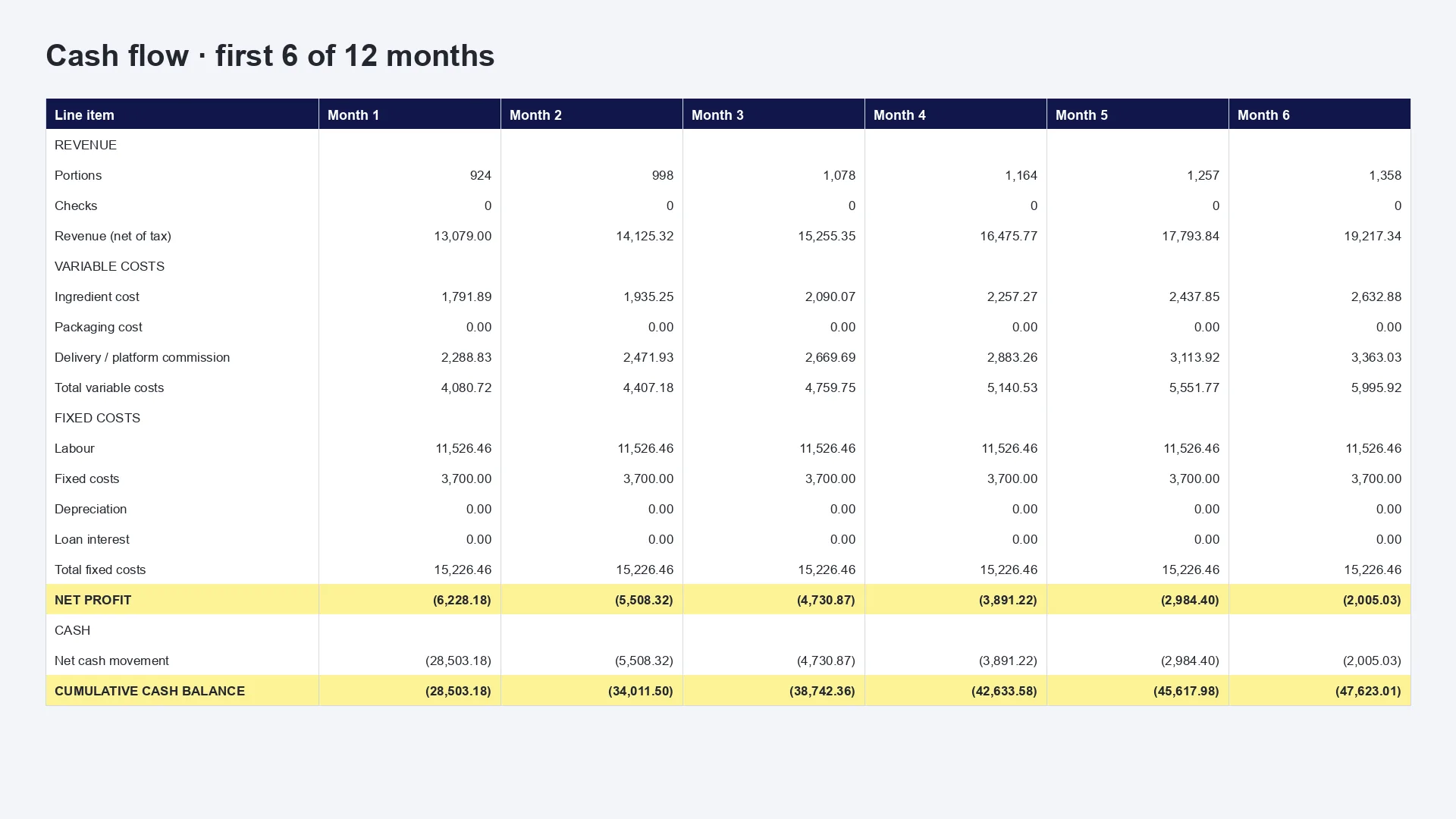
The linked Sheet is our Rio Taco Truck example, so you can click through all seven tabs. Spice Route Kitchen has the same tabs. These are demo inputs, and they are not a forecast for your business.
The seven sections
What goes in a ghost kitchen business plan
You write the sections that need your judgment. The workbook gives you the numbers for the rest.
Executive summary
One page, written last: the brands you run, your delivery radius, the money you need and when you get it back after commission.
Concept and customers
One cuisine or several virtual brands from one kitchen. Note who orders, at which hours, and how far the food can travel.
Market and competition
Open the delivery apps at 7 pm from your planned address. Count competitors in your cuisine, their prices and their fees.
Menu and pricing
A short menu that holds up in a box for 20 minutes, with packaging on each item and prices that survive commission.
Marketing plan
Without a storefront, your marketing is photos, ratings and your own ordering link. Plan a month of posts.
Operations and team
Your kitchen rental, prep schedule, who packs, who hands over to the courier and your own delivery if any.
Financial plan and funding
One steady month net of commission, twelve months of cash and the budget for equipment and packing.
Keep this as a template. The Word file has these seven sections with their prompts and a list of the numbers to bring. It is free with your email.
Download the outline (.docx)Ghost kitchen format · what the app pre-fills
The numbers the app starts you with
Pick Ghost kitchen and the app opens with this crew, these monthly costs and this equipment list. It also opens delivery channels: your own fleet at 100% and a marketplace row at 0%, ready for your real share and commission.
Opening crew
| Role | People | Hours/wk | Pay/h |
|---|---|---|---|
| Owner | 1 | 45 | $0 |
| Cook | 2 | 40 | $19 |
| Prep | 1 | 35 | $16 |
| Driver | 1 | 30 | $15 |
| Labour a month, with 10% employer costs | $12,050 | ||
The app opens owner pay at $0. The workbook warns: “A plan that only works when you work free is not a plan.”
Monthly base
| Rent / pitch | $1,800 |
| Utilities / fuel | $400 |
| Insurance | $150 |
| Software / POS | $200 |
| Marketing | $500 |
| Fixed costs a month | $3,050 |
Opening equipment
| Commercial range 2 × $4,000 | $8,000 |
| Commercial oven | $4,500 |
| Commercial fryer | $1,800 |
| Commercial refrigerator 2 × $2,500 | $5,000 |
| Commercial freezer | $2,800 |
| Stainless prep table 2 × $900 | $1,800 |
| Commercial dishwasher | $3,500 |
| Three-compartment sink | $1,800 |
| Ventilation and extraction hood | $7,500 |
| Food-safe storage shelving 3 × $450 | $1,350 |
| Packing station | $1,200 |
| Opening packaging stock | $1,500 |
| Order tablet and POS 2 × $600 | $1,200 |
| Fire and safety equipment | $1,000 |
| Equipment | $42,950 |
| With the workbook's 10% contingency | $47,245 |
- Delivery commission counts as a variable cost, taken as a share of revenue. Spice Route Kitchen sells 70% through a marketplace at 25%, which blends to 17.5% of all sales.
- The starter marketing budget of $500 is the highest of any format, because no one walks past a ghost kitchen.
- Enter your packaging cost per portion. Spice Route Kitchen left it at $0, and on a real delivery menu that overstates the margin.
Free, in your browser
Test your ghost kitchen break-even
Costs below are the Ghost kitchen starters from the table above. Prices and sales are our sample menu, so replace them with yours. The math and the verdicts match the workbook's Unit Economics tab.
- Sales a month
- Net profit a month
- Net margin
- Simple payback
- Food cost
- Labour
- Prime cost
- Net margin
- Margin of safety
Labour reads high? The workbook says it is “usually a rota problem, not a wage problem.”
What you get back
Seven tabs. 1,800+ live formulas. Every formula already connected.
Not a PDF that goes stale. The plan is a working spreadsheet model — yellow cells are your inputs, everything else is a formula. Change a price, and break-even, profit and cash flow follow.

- 1
Controls
Every setting in one place: format, currency, venues, trading days, crew, monthly base, delivery channels, targets.
Holds up to four delivery channels with their own share and commission.
- 2
Unit Economics
One steady month, per venue and for all venues. Profit, prime cost, break-even, payback and a health check with what to fix.
- 3
Cash Flow
Twelve months with a growth multiplier, staged venues, CAPEX and funding — and the lowest cash point you must survive.
- 4
Menu Engineering
The same columns as the app's menu calculation. Every dish classed Star, Plowhorse, Puzzle or Dog by margin and popularity.
- 5
Cost Cards
Every dish's cost card on one tab — ingredients, gross weights, prep and cooking loss, cost per portion.
Food cost per dish, before commission and packaging.
- 6
Purchase List
Your buying list, aggregated across the menu in gross weight and grouped by category — with an integrity check against the menu.
- 7
Startup Costs
One-off money with estimated, actual and variance columns, plus how it's funded: owner cash, loans, investors.
How it works
Six simple questions to start your plan cooking.
Tap any step to watch it on the phone. Every step feeds a real tab in your Google Sheet.
-
Pick the closest format and how many days a week you'll trade. For this plan that is Ghost kitchen. It only shapes the suggestions; you can change every number.
Feeds Controls
-
Build your opening crew by role — owner, cook, prep, service, driver, manager — then tune hours per week, hourly pay and employer costs. Leave pay at zero for an unpaid role.
Feeds ControlsCash Flow
-
Choose the menu this plan will sell. Food costs come straight from its recipe cost cards and stay read-only; you set prices and how many of each dish you expect to sell a month.
Feeds Menu EngineeringCost CardsPurchase List
-
The costs that keep the doors open whatever you sell: rent or pitch, utilities or fuel, insurance, marketing, software, repairs and professional fees.
Feeds ControlsUnit Economics
-
Start from an editable equipment and opening-setup list for your format. Adjust quantities and prices, remove what you already own, add anything missing.
Feeds Startup CostsCash Flow
-
Your economics on one screen: break-even portions per day, revenue, profit, food, labour and fixed costs. Slide selling prices and sales volume to stress-test the plan.
Feeds Unit Economics
-
One tap on Generate Business Plan Google Sheet. It costs every dish, works out your monthly numbers and projects twelve months of cash flow — about a minute, and you can leave the screen.
-
A live formula workbook that opens from a link. Change a yellow input and break-even, profit and cash flow follow. Make a copy to keep it in your own Google Drive before you share it.
All 7 tabs
 Food truckMobile, lean and full of personality
 CaféCoffee, bites and loyal regulars
 RestaurantA complete dine-in experience
 BakeryFresh batches and counter sales
 Ghost kitchenDelivery-first and highly focused
 CateringEvents, groups and planned production




 Rent / pitch
 Utilities / fuel
 Insurance
 Software / POS
 Marketing


Phone screens are a recreation. Crew, monthly costs and equipment are the app's real Ghost kitchen starters. The menu and sales are a sample with owner pay at $0, so they are not a forecast.
Section 5 of your plan
The marketing section needs real posts behind it
A ghost kitchen has no sign on the street, so photos and posts do that job. FoodPerfect, our sister product, turns phone shots of your dishes into clean dish photos, designs offers with your real prices and fills a month of posts for you to approve.
Each product does its own job, and nothing syncs between them yet. You enter your dish names and prices in FoodPerfect yourself.
Ghost kitchen business plan FAQ
Is a ghost kitchen the same as a cloud kitchen or dark kitchen?
People use the three names for the same model: a delivery-only kitchen with no dining room. In the app it is the Ghost kitchen format.
What margin does the Spice Route Kitchen plan show?
Net margin is 4.8%, and the 6.9% margin of safety is marked fragile. Labour takes 48.5% of sales and delivery commission 17.5%. The demo's food cost of 13.7% is flagged as too low, and at 30% this plan would lose about $2,740 a month. Packaging is also $0, so treat it as a worked example of how the numbers interact.
How much does the app assume a ghost kitchen costs to open?
The Ghost kitchen format starts with $42,950 of equipment plus a 10% contingency, which makes $47,245. Spice Route Kitchen trimmed its list to $20,250 and reached $22,275 with contingency. Renting a kitchen with equipment included cuts this further.
What does FoodTechGuru write, and what do I write?
The app builds the financial section: costed menu, crew, monthly costs, startup budget, break-even and twelve months of cash. You write the concept, the market research and the operating detail, because those need your town and your judgment.
What does a business plan cost in the app?
The app is a free download, and you can open and edit the finished Sheet on any computer. Generating a business plan uses 50 credits and needs a paid Pro or Guru subscription. The Guru trial does not include business plans. Regenerating the same plan is free. The app runs on iPhone today.
Can I send the Sheet to a bank or a partner?
Yes, once you make your own copy. Your plan opens from a link, and anyone with that link can edit it. Use File, Make a copy to keep it in your own Google Drive, or File, Download to send an Excel file.
See the whole thing
Watch the app build a plan step by step
This short tutorial answers all six questions for a food truck, then opens the Google Sheet. A ghost kitchen business plan uses the same steps with your own recipes.
Build your ghost kitchen plan from your own menu.
Cost your dishes, choose Ghost kitchen, enter your delivery channels and open the workbook about a minute later.